ページカレンダー表示プラグイン
このプラグインについて
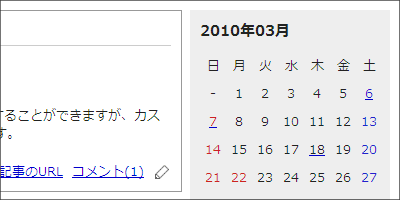
ページ用にカレンダーを表示し、各日付から記事にリンクします。
広告
ダウンロード
以下のリンクからプラグインをダウンロードできます。(GitHubに遷移します。)
GitHubの緑ボタン「Code」内にある「Download ZIP」からすべてのプラグインをダウンロードできるので、解凍後に作成されるフォルダの中から page_calender フォルダを入手してください。
導入方法
準備
あらかじめ管理者ページにログインしておきます。
ファイルのアップロード
page_calender/ 内の configs/ と libs/ を、freo設置ディレクトリ内にアスキーモードで上書きアップロードします。
パーミッションの設定
ブラウザソフトで freo/index.php/setup にアクセスすると、必要なパーミッションが自動設定されます。
ただし、設置時に「ご利用のサーバーは、PHPから直接パーミッションを設定することができない環境のようです。」と表示された環境の場合は自動設定されないので、FTPソフトで以下のファイルのパーミッションを設定してください。
| 対象 | パーミッション |
|---|---|
configs/plugins/calender.ini |
606 に設定 |
テンプレートの編集
カレンダーを表示したいページのテンプレートに、以下の記述を追加します。表示項目やHTMLは、必要に応じて適当に変更してください。
(カレンダーをエントリーのサイドバーに表示させる場合、templates/utility.html に <div class="utility"> ~ </div> のブロックを記述し、その中に追加します。)
<h3>{$plugin_page_calender_year}年{$plugin_page_calender_month}月</h3>
<div class="content">
  <table summary="カレンダー" class="calender">
    <tr>
      <th>日</th>
      <th>月</th>
      <th>火</th>
      <th>水</th>
      <th>木</th>
      <th>金</th>
      <th>土</th>
    </tr>
    <!--{foreach from=$plugin_page_calenders|smarty:nodefaults item='plugin_page_calender' name='loop'}-->
    <!--{if $smarty.foreach.loop.index % 7 == 0}-->
    <tr>
    <!--{/if}-->
    <!--{if $plugin_page_calender.type == 'day'}-->
      <td><!--{if $plugin_page_calender.flag}--><a href="{$freo.core.http_file}/page?date={$plugin_page_calender.date}"><!--{/if}--><span class="day">{$plugin_page_calender.day}</span><!--{if $plugin_page_calender.flag}--></a><!--{/if}--></td>
    <!--{elseif $plugin_page_calender.type == 'satday'}-->
      <td><!--{if $plugin_page_calender.flag}--><a href="{$freo.core.http_file}/page?date={$plugin_page_calender.date}"><!--{/if}--><span class="satday">{$plugin_page_calender.day}</span><!--{if $plugin_page_calender.flag}--></a><!--{/if}--></td>
    <!--{elseif $plugin_page_calender.type == 'sunday'}-->
      <td><!--{if $plugin_page_calender.flag}--><a href="{$freo.core.http_file}/page?date={$plugin_page_calender.date}"><!--{/if}--><span class="sunday">{$plugin_page_calender.day}</span><!--{if $plugin_page_calender.flag}--></a><!--{/if}--></td>
    <!--{else}-->
      <td>-</td>
    <!--{/if}-->
    <!--{if $smarty.foreach.loop.index % 7 == 6}-->
    </tr>
    <!--{/if}-->
    <!--{/foreach}-->
  </table>
  <ul class="calender">
    <li><a href="{$freo.core.http_file}/page?date={$plugin_page_calender_previous}">前の月</a></li>
    <li><a href="{$freo.core.http_file}/page?date={$plugin_page_calender_next}">次の月</a></li>
  </ul>
</div>
設定項目の編集
祝日はデフォルトでは赤い文字で表示されます。管理メニューから「システム」→「設定管理」→「プラグインの設定」→「ページカレンダー表示」を選択すると、独自の休日を定義することもできます。(display.page_calender.php を直接編集して定義することもできますが、バージョンアップが少し面倒になります。)
削除方法
このプラグインは、以下の手順で削除できます。
ファイルの編集
テンプレートに追加したコードを削除します。
ファイルの削除
以下のファイルを削除します。
configs/plugins/page_calender.inilibs/freo/plugins/config.page_calender.phplibs/freo/plugins/display.page_calender.php